
Squawk: Reminders on Unlock2.2.5 - Google Play
You'll be able to see results in few seconds.
Publisher Description
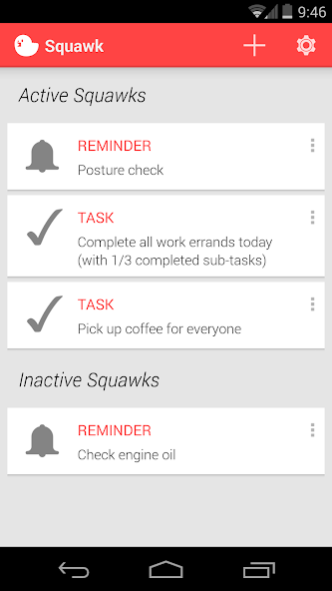
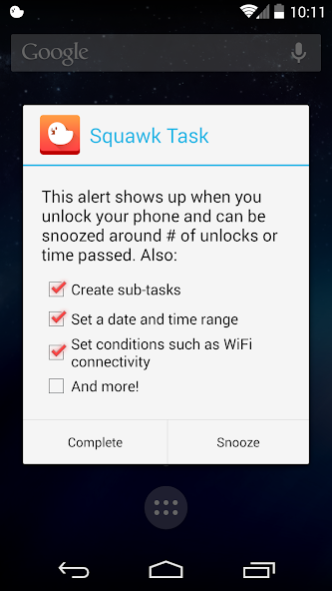
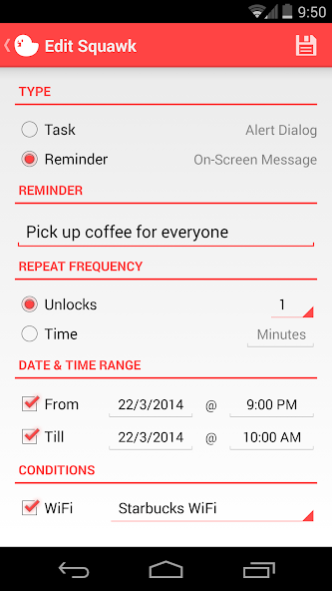
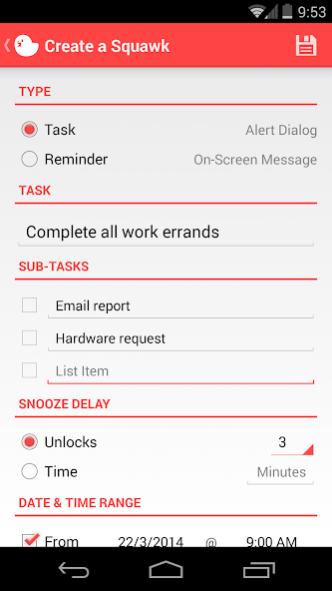
Squawk allows you to easily stay on track for day-to-day tasks, something that traditional to-do list apps fail to deal with.
Featured on LifeHacker http://lifehacker.com/squawk-displays-reminders-when-you-unlock-your-android-1539054218
Your device may require at least a slide lock for this application to work. If you use a non-standard launcher I cannot guarantee the app will work properly.
SLEEK CARD UI
Designed with simplicity in mind to make creation and management of Squawks exceptionally smooth.
NEW APPROACH TO REMINDERS
Squawks are persistent, guaranteed to catch your attention (unlike notifications), and are more natural to your daily life (not scheduled to show up at exact times).
TASKS & REMINDERS
Create tasks, which use an alert dialog, or reminders, which use less intrusive on-screen messages. The free version allows up to 15 Squawks.
SCHEDULING
Set a Squawk to be active only during a certain date & time range for things that require more precise notification.
CONDITIONS
Set a Squawk to be active only when connected to any or a specific WiFi access point (eg. your home, work, school, or coffee shop).
SUB-TASKS
Create sub-tasks for a task to micromanage smaller tasks required for completion (eg. today's errands, work tasks, project tasks).
SNOOZE DELAY
Snooze tasks easily to re-appear in a certain # of unlocks or # of minutes passed since last unlock.
About Squawk: Reminders on Unlock
The company that develops Squawk: Reminders on Unlock is Roman Tymchyk. The latest version released by its developer is 2.2.5.
To install Squawk: Reminders on Unlock on your Android device, just click the green Continue To App button above to start the installation process. The app is listed on our website since 2014-03-27 and was downloaded 0 times. We have already checked if the download link is safe, however for your own protection we recommend that you scan the downloaded app with your antivirus. Your antivirus may detect the Squawk: Reminders on Unlock as malware as malware if the download link to com.romantymchyk.squawk is broken.
How to install Squawk: Reminders on Unlock on your Android device:
- Click on the Continue To App button on our website. This will redirect you to Google Play.
- Once the Squawk: Reminders on Unlock is shown in the Google Play listing of your Android device, you can start its download and installation. Tap on the Install button located below the search bar and to the right of the app icon.
- A pop-up window with the permissions required by Squawk: Reminders on Unlock will be shown. Click on Accept to continue the process.
- Squawk: Reminders on Unlock will be downloaded onto your device, displaying a progress. Once the download completes, the installation will start and you'll get a notification after the installation is finished.
Program Details
System requirements
Download information
Pricing
Version History
version 2.2.5
posted on 2014-03-27
- List of known WiFi connections will appear when WiFi is disabled (must start the app at least once with the WiFi enabled - this list of known WiFis is updated on each start of the app)
- Preparation for more features in a future release (increase in app size by ~.5 mb)
version 2.2.5
posted on 2014-03-28
- List of known WiFi connections will appear when WiFi is disabled (must start the app at least once with the WiFi enabled - this list of known WiFis is updated on each start of the app)
- Preparation for more features in a future release (increase in app size by ~.5 mb)
Disclaimer
Official Google Play Link
We do not host Squawk: Reminders on Unlock on our servers. We did not scan it for viruses, adware, spyware or other type of malware. This app is hosted by Google and passed their terms and conditions to be listed there. We recommend caution when installing it.
The Google Play link for Squawk: Reminders on Unlock is provided to you by apps112.com without any warranties, representations or guarantees of any kind, so access it at your own risk.
If you have questions regarding this particular app contact the publisher directly. For questions about the functionalities of apps112.com contact us.
